Banana Split features Everything the app does, in detail.
All 17 Banana Split features, from the first coffee paid to the last transfer: add an expense, follow balances in real time, scan a receipt, split costs in several currencies and settle up in as few transfers as possible.
INDIVIDUAL VIEW
What it costs you, just you.
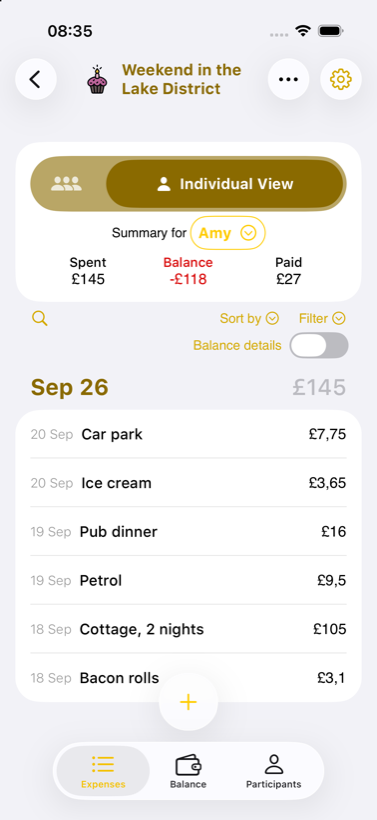
Dinner came to €50, but what did it cost you? In every group, the Individual View tab keeps only your share of each expense, then your total and your balance. The weekend's bill, at your scale.
Weekend in the Lake District · Amy
- Bacon rolls 3.10group 12.40
- Cottage, 2 nights 105.00group 420.00
- Petrol 9.50group 38.00
- Pub dinner 16.00group 64.00
- Ice cream 3.65group 14.60
- Car park 7.75group 31.00
01
Who paid what
Three seconds at the till, and the group's tally is already up to date: the Banana Split features for logging who paid what, even with several payers.
-
Added in 3 seconds
The amount, who paid, who's in. No endless form: the expense is logged before the waiter comes back with your card.
-
Splits that fit real life
Equal shares, exact amounts, percentages or shares, adjusted with a slider. Every expense splits the way it actually happened.
-
Multiple payers
Three of you paid the bill? One expense, several payers, and balances that stay right.
-
Active and inactive members
A flatmate moves out, a friend leaves the trip halfway? Set them inactive: no longer suggested on new expenses, while their history and balances remain.
-
Categories
Restaurants, groceries, transport, housing… Sort every expense and see where the group's money actually goes.
-
Payment method
Card, cash or transfer: record how each expense was paid, for a tally that matches reality.
-
Receipt scan
Photograph the receipt: the app reads the total and every line, and you assign each item to whoever had it. All read on the phone.
-
Recurring expenses
Rent, Netflix, the gym: set them up once and they create themselves every month.
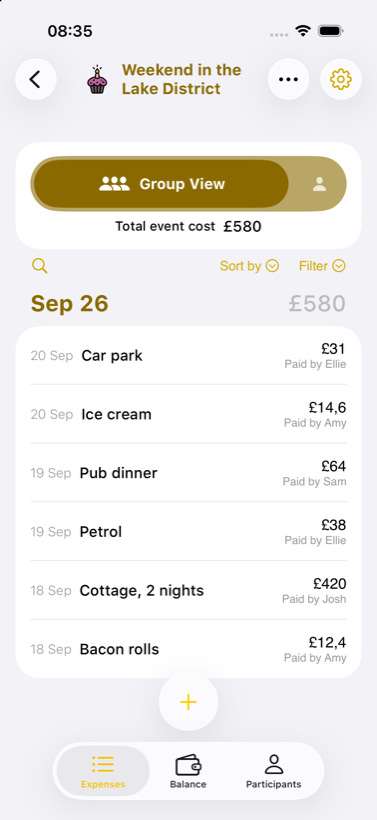
Weekend in the Lake District
- Bacon rolls 12.40paid by Amy
- Cottage, 2 nights 420.00paid by Josh
- Petrol 38.00paid by Ellie
- Pub dinner 64.00paid by Sam
- Ice cream 14.60paid by Amy
- Car park 31.00paid by Ellie
02
See clearly
Balances update the second an expense is logged. With the Banana Split features, everyone sees who owes what, at any time.
-
Live balances
Who owes what, to whom, at any moment. Everyone sees the same tally, no waiting for the end-of-trip reckoning.
-
Individual View
In every group, a tab just for you: your share of each expense, what you spent and your balance.
-
Per-person view
Each participant's spending in detail: who paid for what, when, and how much.
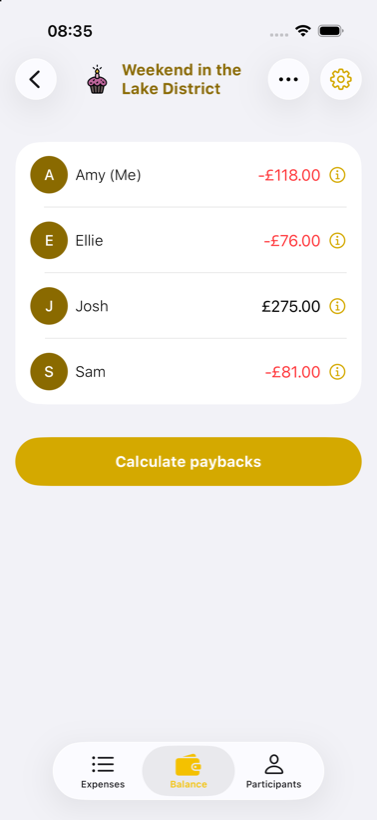
Weekend in the Lake District · BALANCES
- Amy -118.00
- Josh +275.00
- Ellie -76.00
- Sam -81.00
03
Settle up
As few transfers as possible, and accounts that end at zero: the Banana Split features for settling up work out who pays whom.
-
Optimised transfers
The app works out the minimal set of transfers so everyone is repaid: fewer payments, fewer things to forget.
-
Multi-currency repayment
The trip was tallied in yen and the repayment happens in euros back home? The app converts and settles the balance properly.
Weekend in the Lake District · WHO OWES WHAT
- Amy → Josh 118.00
- Sam → Josh 81.00
- Ellie → Josh 76.00
04
Everywhere with you
On the road, off the grid, on your phone or in a browser: the Banana Split features work offline and sync when you're back.
-
Multi-currency groups
Euros in Paris, yen in Tokyo: mix currencies in a single group, converted at the daily rate.
-
Offline mode
No Wi-Fi in the mountain hut, no signal abroad? Log it anyway. Everything syncs when you're back.
-
Web access
Check your accounts from any browser, even without your phone.
-
Dark mode
Scroll through the trip's expenses at 2am without burning your eyes.
Trip to Japan
- Ramen ¥3,200→ 19.81 EUR
- Metro, 4 tickets ¥1,120→ 6.93 EUR
- Temple entry ¥2,000→ 12.38 EUR
In the app
QUESTIONS
Frequently asked about Banana Split features
Is it really free?
Yes, completely. No subscription, no in-app purchases.
Do you touch my money?
No. We never access your bank accounts. We only keep the tally.
Do I need an account?
No. Open the app, start a group. Others join via a link.
Does it work abroad?
Yes. All major currencies, with daily exchange rates.
What if someone doesn't pay?
We help you send a friendly reminder. The rest is up to you.
Free, no account, ready in 30 seconds.
Add an expense, scan a receipt, split costs in several currencies, check balances in real time: all the Banana Split features are on iPhone and Android, in the same app for the whole group.
Go bananas, not broke.